
Kayzen is a DSP platform powered by programmatic algorithms, with a focus on in-app media buying. Media buyers, brands and agencies have taken an interest in the platform thanks to its DSP engine, advanced analytics and transparent approach to campaign setup and management.
As with other advertising platforms, Kayzen has its own specifics. If you start without understanding them in advance, you’ll have to figure things out along the way. To save our readers time, the RentAcc team has prepared a detailed guide to campaign preparation, covering creative requirements, supported app types, campaign types, and more.
How Campaign Setup Works in Kayzen
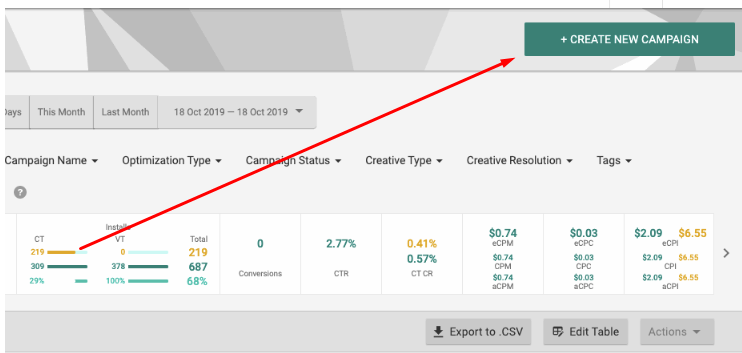
To create an advertising campaign, click the “Create New Campaign” button in the top-right corner of the interface. Enter the campaign name and assign tags to make navigation easier later.
The initial campaign setup in Kayzen includes 4 key stages:
- Order: the foundation of the campaign — link, app name, budget, and other parameters;
- Click Destination: a tool that pulls technical information about the app from the Order for future campaigns;
- Deal ID: a code that provides access to promoting digital products in specific apps or a private auction. Multiple Deal IDs can be specified within a single campaign;
- Ad Schedule: setting the timeframes during which your performance advertising will run.
In Kayzen, all campaigns are linked to an Order — a ready-made setup. For future launches, you won’t need to fill in these parameters manually.
Stage #1: Available Campaign Types
The Kayzen ad network offers media buyers 2 main campaign types — UA and retargeting. The first focuses on acquiring new users, while the second is aimed at reactivating inactive users. Let’s briefly look at each campaign type.
UA Campaigns
To launch a UA campaign, a media buyer needs to upload 2 exclusion lists:
- Historical Suppression: device IDs that have interacted with the app within the past 3–12 months;
- Dynamic Suppression: dynamic data from the MMP tracker.
Once this information is provided, the algorithms will not serve ads to users who have previously interacted with your app. If the app is new, uploading these lists is not required.
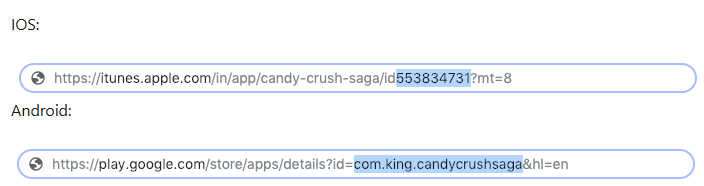
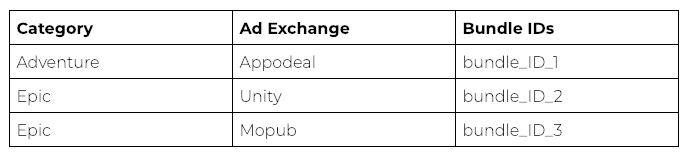
This campaign type also supports a whitelist/blacklist system. A media buyer can exclude advertising from specific apps or limit delivery to a narrow pool of apps. To access app filtering, you need to upload the Bundle ID. If you plan to promote direct links or PWA apps, you need to specify the domains.
Kayzen also has automatic blacklists. Over time, the algorithms collect data: if the number of impressions is high but there are no target actions, the apps are excluded. The criteria depend on the traffic price, campaign goal, and conversion rate.
In addition to apps, inventory can also be filtered by selecting the ad networks where the ads will be served. Developers recommend collecting statistics for 10–14 days.
Retargeting Campaigns
Local retargeting includes 3 separate campaign types.
| Retargeting Campaign Type | Purpose |
| Reacquisition | The campaign is designed to reactivate users who stopped using the app after a certain period of activity |
| Increase App Usage | The campaign targets users who have not opened the app for several days |
| Increase App Revenue | The campaign is designed to maximize revenue |
To prevent retargeting campaigns from underperforming, you need to configure DeepLink and properly segment the audience. Kayzen has a built-in audience builder: the algorithms collect information about user actions inside the app, while the data itself comes from the MMP tracker.
Stage #2: Campaign Optimization Goals
Kayzen offers only 3 campaign optimization goals. Let’s briefly look at each one.
- CPI. Kayzen primarily focuses on the CPI model. In most cases, these campaigns are used to acquire users for deposits, registrations, and other target actions. If meaningful post-install events are passed, the algorithm gets more data to optimize traffic quality.
- CPC. Optimization for clicks. Local support teams recommend using these campaigns for retargeting — to push users who have previously interacted with the app further down the funnel.
- CPM. With these campaigns, the buyer purchases impressions, with the main goal being to increase reach. At the same time, CPM campaigns in Kayzen include bid optimization mechanisms such as Bid Shading.
What to choose depends on your goals, the product being promoted, and the specific stage of the funnel.
Stage #3: Targeting Setup
The Kayzen ad network offers an advanced targeting system. In addition to basic settings such as country, specific city, and advertising platform, you can also filter users by the following parameters:
| Targeting Parameter | Description |
| Latitude & Longitude | In addition to countries and cities, you can target specific geographic areas within a country |
| ZIP Code | You can target regions associated with ZIP codes. Up to 1,000 ZIP codes can be uploaded within a single campaign |
| Traffic Type | This determines where the ad will be shown: in apps or across the mobile web. If neither option is selected, creatives will run both in apps and on the mobile web |
| Connection Type & Mobile Operators | Users connected via Wi-Fi or mobile internet. If the latter option is selected, you can target specific mobile operators |
| Platform & Operating System | Segment the audience by platform and OS version. For operating systems, you can select specific versions or set a desired range |
| Device Type & Manufacturer | In addition to targeting phone or tablet users, you can select a specific manufacturer |
| Device ID | You can target devices that do or do not pass a Device ID. There is nothing preventing you from selecting both options |
| App Category | A three-level parameter: you can target a specific app category, genre, and subgenre |
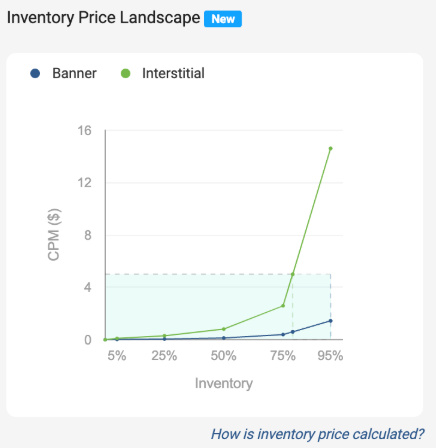
The Kayzen interface provides an estimate of potential impressions and information about inventory costs. These tools help estimate the available traffic volume in advance based on the selected targeting settings.
Important: the potential impressions estimator does not take certain parameters into account, including ZIP codes, coordinates, IP lists, and some exclusion lists. This is only a preliminary estimate and should not be treated as an exact forecast.
For the forecast, the algorithms use historical data from relevant auctions over the past 7 days.
The ad network also allows you to create blacklists and whitelists at the device ID level — to do this, you need to provide the algorithms with information from previous campaigns.
Stage #4: Creative Uploads and Requirements
Kayzen supports 4 main creative types — native integrations, images, HTML format (Playable Ads), and videos. There are also 4 additional subtypes.
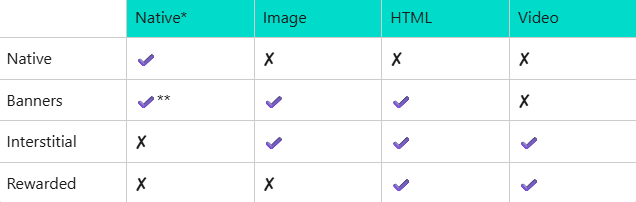
Interstitial ads are not available for the native format, while rewarded ads are not available for native integrations or static images.
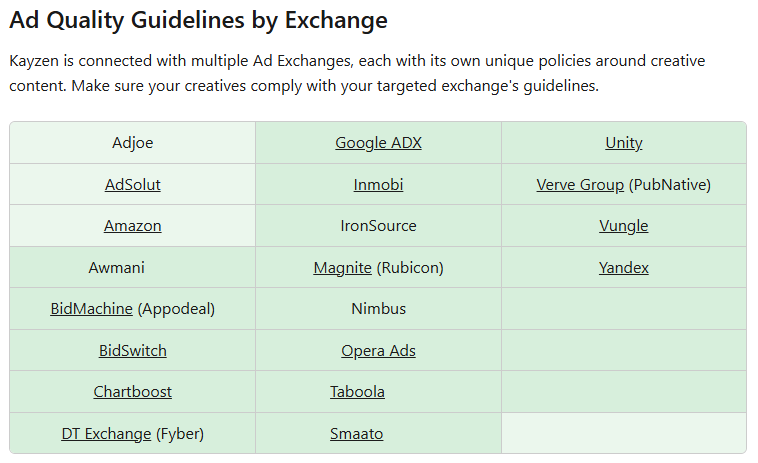
The main thing to keep in mind about creatives is that Kayzen is integrated with twenty ad networks, and each platform has its own creative requirements, both technical and content-related.
Stage #5: Budget Management
Kayzen offers media buyers 2 ways to work with their budget: a deposit-backed credit line and full prepayment.
Credit Line. The credit line mechanism is based on an evaluation system called the credit multiplier — a risk score ranging from 1 to 5. Kayzen does not disclose the evaluation criteria, but the basic calculation is clear.
Let’s say your credit rating after registration is 1.5. If you plan to spend $45,000, you need to provide a $30,000 deposit to access that amount. If there are no invoice payment issues, the rating may increase over time. Points can also be earned by making additional deposits.
Full Prepayment. With full prepayment, the media buyer pays the invoice in advance and can only rely on the available balance. To prevent campaigns from stopping unexpectedly due to insufficient funds, the platform estimates the average time until the budget is depleted and sends email or UI notifications approximately 7 days before the expected balance depletion.
Stage #6: MMP Integration and Analytics
To access information about installs and post-install events, you need to configure attribution. Otherwise, the media buyer will not have access to analytics or the ability to create custom audiences for UA campaigns and retargeting.
The Kayzen ad network integrates with seven MMP trackers:
- Appsflyer;
- Adjust;
- Branch;
- Kochava;
- Singular;
- Tenjin;
- JustTrack.
In addition, Kayzen integrates with S2S trackers and pixels for tracking events on websites.
Conclusion
To prepare for launch, it is important to determine the campaign type, create user blacklists and whitelists, configure targeting and study the creative requirements of the specific ad networks in advance. Before launch, make sure that events from the MMP tracker are being passed correctly and that DeepLinks lead to the right page.
You can get access to a Kayzen ad account through RentAcc — we’ll handle balance top-ups and help with all the technical nuances of launching campaigns. And if you work as a team, the RentAcc CRM with Team Access lets you bring everyone into a single workspace, distribute roles and configure access levels for each team member.
You can request access to Kayzen and other in-app platforms through the Telegram bot — we’ll review your request as quickly as possible and help with the launch.
Go to RentAcc | Telegram Bot | Latest News
RentAcc is a platform for working with Facebook and in-app — ready-made agency accounts and automation. Suitable for solo buyers and teams who value stability, transparency, and a technological approach.
Commission: 4 to 10%
Inside the platform:
— agency accounts for any verticals and GEOs
— free replacements and money-back guarantee
— centralized control of spending
— technical support for launches
— instant notifications in the TG-bot






Sending the message, you agree to follow by the terms of our. Privacy policy.