


While running traffic through Facebook requires significant spending on cloaking, antidetect tools, proxies, and account farming, which naturally increases the cost of testing, the in-app platform Unity Ads allows you to work with iGaming traffic in permitted GEOs while complying with the platform’s requirements. However, the absence of these additional costs does not mean you can enter in-app with any budget — at the start, it is important to give the algorithm enough funds to collect data.
The question remains: how much money should you allocate for the launch, how should you distribute the budget across days or countries, and how much will ultimately be needed for a successful start? Experts from the RentAcc advertising platform will provide genuinely useful recommendations regarding the minimum budget for launching Unity Ads and developing a strategy for spending it.
Automated bidding: how does the algorithm distribute spend?
Automatic bid adjustment allows the algorithm to change bids throughout the day and distribute spend within the set budget. The strategy can be used with both CPM and CPI billing.
With CPI billing and without automatic bidding, a converting campaign combination can spend the daily limit too quickly, causing the weekly budget to run out earlier than planned. Automatic bid adjustment helps avoid this: even with overspending, the system will still stay within the weekly limit. To enable this feature, you need to set a daily budget.
In the official Unity Ads documentation, the following values are recommended:

The daily budget should be calculated based on the weekly amount. For example, if you plan to spend $700 per week on a campaign, the daily limit will be $100. This calculation works for both CPI and CPM billing. The algorithms will automatically adjust bids depending on the results of the advertising campaign, allowing you to use the planned daily spend more efficiently and get more installs with the same budget.
Automatic bidding also offers advantages for campaigns optimized for ROAS. When launching a ROAS campaign in Unity, it is enabled automatically. The strategy helps work more efficiently with a limited daily budget and can increase the observed ROAS.
Minimum budget to start
Unity recommends allocating at least $50 per day for each country and each creative group. This budget should be enough to collect the first data and train the algorithm.
At the same time, the minimum budget should primarily be viewed as an option for technically testing the campaign. A micro-budget allows you to check whether the integration is configured correctly and whether postbacks are being transmitted at every stage of the chain — from the affiliate program and tracker to the MMP and SSP. However, for full algorithm training, a small spend can actually increase the time required to collect sufficient data.
Based on the experience of the RentAcc team, for Tier-2 and Tier-3 GEOs, a practical starting budget can be considered around $250 per day per campaign. For Tier-1 GEOs — from $300, with around $350 being optimal. A higher budget gives the algorithm access to a larger number of placements, speeds up the learning process, and allows it to accumulate data for building a blacklist faster.
The total campaign budget should be at least 5 times larger than the daily budget. If the daily limit is $500, the total budget should be at least $2,500. This buffer gives the algorithm more time to learn and reduces the risk of the money running out prematurely before the platform has collected enough data for optimization. This budget is already enough to start, as numerous discussions on forums suggest, but much more important is developing the right advertising strategy so you don’t burn through your budget for nothing.

A low daily limit can cause the system to spend the budget less predictably during the first few days. At the start, the algorithm does not yet know which users and placements deliver the best results, so it needs time and a sufficient volume of traffic for optimization.
In addition, a budget that is too small can limit reach among users with higher purchasing power. In campaigns with a daily limit of around $100 or less, overspend of approximately 10–20% above the set daily budget can also occur in practice.
At RentAcc, the minimum top-up for working with Unity is $2,000, but in practice, buyers often reach larger volumes — within one or two weeks, the budget can reach $10,000 or more. Everything is highly individual, and the final amount depends on the number of GEOs, creative quality, and campaign objectives. If you use RentAcc agency accounts, the platform’s managers will help with the launch and provide recommendations that make it easier to pass moderation on the source and achieve the first results.
6 Budget Setup Strategies
There are 6 approaches to budget setup. The choice should be based on your user acquisition strategy; let’s briefly look at all of them.
| Strategy | Description |
| Unlimited | Do not specify either a daily budget or a total campaign budget. The system will manage the spend automatically. |
| Campaign limit | Specify the total budget but leave the daily limit empty. In this case, the system will be able to spend the funds within the set amount. |
| Daily limit | Specify a daily budget and set a very high total campaign budget. This allows you to control daily spend without limiting the campaign by a total amount. |
| Combined | Specify both the total campaign budget and the daily limit. This approach allows you to control both the maximum spend for the entire period and the amount the system can spend per day. |
| Overall | A single limit is set for multiple GEOs, and Unity automatically distributes the budget between them. In practice, this approach requires caution: spend may shift toward GEOs with more expensive performance. |
| Per country | A separate daily budget is set for each GEO. This approach provides more control over spend and performance and is more commonly used when scaling campaigns. |
After the testing stage, you can increase or remove the daily limit to ensure a larger volume of impressions.
When to use an overall budget for countries?
Unity allows you to set a single budget for multiple GEOs, but in practice, this approach is not suitable for every campaign. When countries are combined, the algorithm determines where to allocate more traffic, and the budget distribution does not always match the expected performance. In some cases, most of the spend may go to GEOs where performance comes at a higher cost.
Therefore, for campaigns where it is important to control the cost and traffic volume for each market, it is better to set a separate budget for each GEO. Larger teams can also set separate budgets for high-performing placements within a specific GEO and campaign.
A multi-GEO approach can be used for testing, but its results should be monitored closely. The more countries differ in terms of traffic costs and available audience size, the higher the risk of uneven budget distribution.
How to set a group budget?
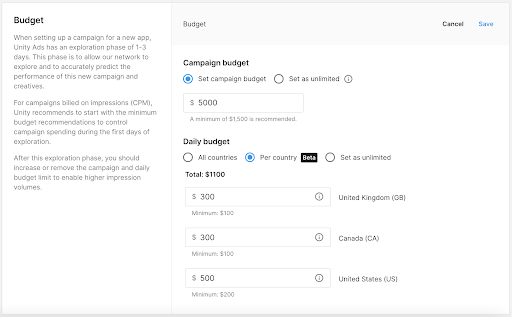
To set a daily budget that will apply to all countries, go to the «Budget» section when setting up the campaign.
- Select «Set campaign budget» and enter the campaign budget.
- Select «All countries» to set a daily budget.
- Specify the daily limit you want to apply to all countries in your campaign.
Here you can also configure budget allocation by country by selecting the «Per countries» option and manually entering daily limits for each country.
Why You Shouldn’t Panic Over Fluctuations?
In Unity, the budget is distributed over a 7-day window, so daily spend does not necessarily have to be the same. If spending exceeds the set amount on one day, the system may reduce spend on subsequent days to compensate for the difference. On average, daily spend over the course of a week will correspond to the set target. Therefore, it is better to calculate the daily limit based on the total amount you are prepared to spend per week.
When launching a campaign, it is better to give the algorithm room to learn. For CPE campaigns, you can start with a bid approximately 1.2 times higher than the target value. If the campaign delivers the desired results, it is better to lower the bid gradually and no more than once every three days.
For ROAS campaigns, it is recommended to start with relatively low values. One working approach is to set ROAS at 50% and then lower it in 5% increments, monitoring the level at which the campaign starts delivering consistently.
How to Scale a Campaign?
When scaling, you do not necessarily need to change the ROAS. If the campaign is performing consistently, you can gradually increase the budget while keeping the current ROAS target.
For Unity, a daily budget of around $500 can be used as a benchmark, but it is better to reach this level gradually, in several stages. A sharp increase in spend can disrupt the current optimization.
This is especially relevant for campaigns that were initially launched with a small budget. A sharp increase in the limit can send the campaign back into the learning phase and lead to a loss of current performance. At the same time, there is no universal safe scaling step: in practice, there are both successful campaign duplicates with the budget increased from $500 to $1,000–1,500 per day and cases where increasing the budget from $50 to $250–300 led to relearning.
Scaling opportunities also depend on the size of the GEO. The larger the available audience and inventory volume, the easier it is for the algorithm to absorb additional budget. In smaller markets, such as the Netherlands, it is significantly more difficult to sharply increase volume without affecting performance.
It is better to increase the budget every 2–3 days, evaluating the results after each change. At the same time, you should monitor creative performance and update creatives as needed, using the accumulated data as a guide. The algorithm may direct most of the traffic to the best-performing creative, so you should not expect spend to be distributed evenly across all variants, and underperforming creatives should be switched off immediately.
A higher budget also accelerates not only campaign learning but also the collection of placement statistics. The faster data accumulates, the sooner you can identify inefficient placements and build a blacklist. Regularly working with it can have a significant impact on the campaign’s overall performance.
Conclusion
Working with the budget in Unity Ads requires not so much strict adherence to a single limit as an understanding of how the system distributes spend and learns from data. At the start, it is important to give the algorithm enough room to learn, and when scaling, not to try to increase volume too sharply. Gradually increasing the budget, monitoring results, and regularly working with creatives allow you to manage results without any major issues.
At the same time, a lot depends on the team structure and how convenient it is to control advertising accounts, finances, and statistics. In RentAcc, you can now add team members, assign roles, and set each person’s level of access to accounts, finances, and statistics. Simplify ad management with a convenient, technology-driven CRM platform and confidently start running campaigns on Unity Ads.
Go to RentAcc | Telegram Bot | Latest news

RentAcc is a platform for working with Facebook and in-app — ready-made agency accounts and automation. Suitable for solo buyers and teams who value stability, transparency, and a technological approach.
Commission: 4 to 10%
Inside the platform:
— agency accounts for any verticals and GEOs
— free replacements and money-back guarantee
— centralized control of spending
— technical support for launches
— instant notifications in the TG-bot







Sending the message, you agree to follow by the terms of our. Privacy policy.